
By Nitso Team
10-minute read ● Updated: 14 November 2025
If you have ever made a salary in a big Excel sheet late at night, you know how stressful😨 payroll can be.
Payroll software is a simple tool that helps you calculate salaries cleanly and accurately.
- Basic salary
- Allowances
- Overtime
- Leaves
- PF, ESI, TDS
- Reimbursements
You set the rules once, and after that, the system does most of the work for you every month.
You can think of it like the engine of your payroll process. It:
- Takes employee data (salary, attendance, leaves)
- Applies your company rules and policies
- Calculates all statutory deductions
- Creates payslips for employees
- Gives clear reports for HR, finance, and management
If you are completely new to payroll as a topic, first read a simple guide on what is payroll, and then come back to understand how payroll software makes that job easier.
Table of Contents
What are the Types of Payroll?
- Most businesses in India usually move through three stages of payroll.
- First, everything is done manually in Excel by the founder or HR.
- Then, as things get messy, they hand it over to a CA or a payroll agency.
- Finally, when the team grows further, they shift to a proper cloud-based system.
All three have their place – the key is to know which stage you’re in right now.
In-house payroll handled by your HR manager
Your HR or accounts person manages payroll using Excel, Tally, and a bunch of manual checks.
For a very small team, this feels manageable and “under control”. You can tweak salary structures quickly, adjust arrears, and handle one-off payments on the fly.
But as soon as you cross 10–15 employees, cracks start to show:
- File versions get mixed up
- Formulas break
- Tax slabs or PF/ESI rules change
- Nobody remembers who updated which sheet last
One small typo can mean someone getting the wrong salary or a mismatch in PF, ESI or TDS calculations.
Over time, month-end becomes stressful and risky instead of routine.
Outsourced payroll managed by a CA or agency
The next common step is outsourcing payroll to a CA firm or payroll agency.
This is helpful when you don’t have internal expertise on things like PF, ESIC, TDS, Professional Tax and bonus laws. You share attendance, salary details, and changes each month, and they:
- Process payroll
- Give you salary sheets and reports
- Share statutory summaries for filing
This reduces internal workload, but it also creates dependency.
If your CA is busy during tax season, your payroll can get delayed. Any last-minute adjustment means back-and-forth.
You also have less real-time visibility – data lives with the vendor, not with you. And you’re still emailing spreadsheets with sensitive employee information every month, which is not ideal from a data privacy point of view.
Cloud-based payroll software
Cloud-based payroll management software is the modern way to run payroll.
Everything sits in one secure online system – employee data, salary structures, attendance, leave, reimbursements, PF/ESI/PT/TDS rules and reports. Your HR and finance team simply log in, review, and process payroll in a few clicks.
Because it’s built for Indian payroll, the system can handle:
- EPF
- ESIC
- TDS on salaries
- Professional Tax
You get automation, accuracy, and a clear audit trail – without losing control.
For growing businesses, this ends up being faster, safer, and actually cheaper than juggling Excel files or depending fully on an external agency every month.
Why Do You Need Payroll Software?
If payroll still means “long evenings with Excel, calculators and WhatsApp messages to the CA”, you’re already paying a hidden cost – in time, stress and risk.
Good software helps you automate most of your payroll process and moves you from survival mode to a stable, repeatable system that works even when your team and locations grow.
Signs you have outgrown Excel and manual work
You don’t need a big consulting report to know it’s time to upgrade. A few honest questions are enough:
- Are you spending more than a day or two every month just to close salaries?
- Do you have multiple versions of the “final” payroll sheet in your email?
- Have you ever had to correct a wrong salary credit or tax deduction?
- Are PF, ESI, TDS, or Professional Tax challans always a last-minute panic job?
- Do employees keep asking HR for payslips, tax details, or loan balances again and again?
Impact on the business owner, HR, and finance team
When payroll is manual, everyone pays the price differently:
- Business owner/founder:
• Worry about penalties, notices, and employee trust if the salary is delayed or wrong.
• Month-end becomes firefighting instead of planning. - HR team:
Instead of focusing on hiring, engagement, or policies, they get stuck in repetitive data entry, checking formulas, and answering pay slip queries. - Finance team:
Struggles to reconcile payroll with accounts, track provisions, and generate reports for audits or lenders.
A good payroll system calms all three sides. HR works on people, finance works on numbers, and the founder doesn’t have to worry whether salaries will go through correctly this month.
How payroll software supports business growth
As your headcount grows across branches, cities, or even different states, payroll complexity quietly explodes.
Different salary structures, shift patterns, PF/ESI/PT rates, state-wise rules, and reimbursements all pile up.
Payroll software gives you a single system where:
- New employees can be added with ready-made templates
- Different locations and salary structures stay under one roof
- Compliance for EPF, ESIC, TDS, and Professional Tax is built into the process
- You can see real-time payroll cost reports while planning hiring, appraisals, or new branches
So as the business scales, payroll doesn’t collapse under its own weight.
11 Benefits of Payroll Software
Here are eleven very real benefits companies see after moving from Excel or agency-only payroll to a proper system:
- Hours saved every month
- Far fewer salary and tax errors
- Built-in EPF, ESIC, TDS, and Professional Tax compliance
- Faster salary processing and bank uploads
- Clean payslips and reports for audits
- Employee self-service for payslips and tax details
- Centralised payroll data instead of scattered files
- Better data security and access control
- Easy handling of remote, hybrid, and multi-location teams
- Better visibility for management through analytics
- Less stress every month-end
You can also read a focused breakdown of the benefits of payroll software if you want a shorter, checklist-style view.
Saving time and reducing manual work
- Most teams feel the time savings almost immediately.
Instead of building salary sheets from scratch, the system remembers last month’s structure and only needs updates – new joiners, exits, increments, bonuses, and so on. Attendance and leave data can flow in automatically if it’s integrated.
Things that used to take hours – like preparing salary registers, bank transfer files, or breakup-wise reports – can now be generated in a couple of clicks. This is especially powerful for SMEs, where the same HR or accounts person is handling multiple roles and simply doesn’t have the luxury of time.
And when you also plug in a dedicated spend management software for claims and reimbursements, most of the routine back-office work starts to run on rails.
Improving accuracy and compliance
Indian payroll is tightly linked to multiple laws – EPF, ESIC, Income Tax (TDS on salaries), state-wise Professional Tax, and more.
Manually tracking rule changes or thresholds in Excel is tough, and a wrong deduction or late payment can invite penalties or notices.
Payroll software reduces this risk by:
- Using defined formulas for PF, ESI, TDS, and PT as per current rules
- Standardising salary structures and calculations
- Generating the statutory reports and summaries you need for filings
- Maintaining a clear audit trail of who changed what and when
You still stay responsible for compliance, but now you have a tool designed to support that responsibility instead of working against you.
Giving employees better transparency and access
Employees today expect clarity. They want to know:
- How their CTC breaks into earnings and deductions
- Whether PF, ESI, and tax are being deducted correctly
- How much leave do they have, and what was paid in overtime or allowances
With a good payroll system and self-service portal, employees can:
- Download their own payslips
- See tax projections
- Access records
All this without emailing HR for every small thing.
They can even use an online salary calculator to understand their in-hand amount better during appraisals, job offers, or internal changes.
How to Choose the Right Payroll Software in India?
The real difference shows up in how well they handle Indian payroll, how easy they are for your team, and how reliable the support is when you’re stuck at 8 PM on salary day.
Some companies start with payroll-only tools and later move to full hrms systems as their needs grow.
Others directly look for a complete human resource management system that packs HR + payroll together.
Key features to check before finalising
When you evaluate payroll software for India, look for:
- Strong Indian compliance: EPF, ESIC, TDS, Professional Tax, gratuity, and bonus support
- Flexible salary structures: different CTC patterns, variable pay, shift allowances, overtime, location-wise differences
- Integration with attendance and HR: so you’re not importing and exporting Excel files every month
- Employee self-service: portal or app for payslips, tax details, leave, and profile updates
- Multi-branch, multi-location support: if you operate in more than one city or state
- Reports and analytics: salary registers, department-wise cost, variance report, and audit-ready data
Questions to ask your payroll software vendor
Before you sign up, sit with the vendor (or have a detailed call) and ask practical questions like:
- How long does implementation usually take for a company of our size?
- Who will help us with the migration from Excel or our old system?
- How do you handle changes in tax laws, PF/ESI rates, or rules?
- Can you show a live demo with our kind of salary structure?
- Is attendance/leave integration, or do we need extra tools?
- What happens if we want to exit later – can we download all our historical data?
The answers will tell you whether the vendor understands Indian payroll on the ground or is just selling generic software.
Pricing, data security, and support checklist
Three areas you should never skip:
- Pricing:
Is it per employee, per month, or a flat fee?
Are there extra charges for onboarding, training, custom reports, or integrations? - Data security:
Where is the data hosted?
Is it encrypted?
Who has access?
How often are backups taken? - Support:
Do you get phone, WhatsApp, or email support?
Is there a dedicated account manager?
What is the response time, especially during payroll days?
A slightly higher subscription is worth it if it comes with reliable support and solid security, especially when you’re dealing with sensitive employee information and statutory compliance.
How is Nitso Payroll Different from Other Payroll Software?
There are many payroll tools in the market, but very few are built first for Indian businesses instead of being global products “adjusted” for India.
Nitso sits firmly in the first group – designed around Indian payroll rules, Indian business realities, and Indian-style support.
Built for Indian payroll and statutory compliance
Nitso is designed specifically for Indian organisations and supports key compliances like PF, ESIC, TDS, and Professional Tax as part of the core product, not as an afterthought.
That means:
- Salary structures, deductions, and reports are aligned with Indian laws
- Updates in rules can be reflected centrally instead of you manually editing formulas
For HR and finance teams, this is a big relief – especially when dealing with audits, funding rounds, or due diligence.
Flexible salary structures and industry-wise setup
Different industries pay people in different ways.
A trading company, IT firm, manufacturing unit, and service provider rarely share the same salary pattern.
Nitso’s payroll engine is built to handle:
- Complex CTC structures
- Variable components
- Bonuses and arrears
- Multi-location payroll
Bulk processing and multi-location support mean you can run payroll for different branches or business units without juggling separate tools.
As your team grows, the system grows with you instead of forcing you to reinvent your payroll model.
Local onboarding, training, and long-term support
Where Nitso really stands out is the way it supports smaller and mid-sized Indian businesses:
- A starter option suitable for small teams, including a free hr software plan for early-stage companies
- Fast onboarding and guided setup – you don’t need a big IT team to get started
- Responsive local support, so you’re not stuck waiting days for answers on payroll issues
For many companies, this combination of Indian compliance, flexible setup, and human support makes Nitso a practical long-term partner rather than just another software subscription.
And as you expand beyond payroll, you can connect it with tools like recruitment management software, employee tracking software, and asset management software to build a complete people and operations stack.
Payroll Processing in India
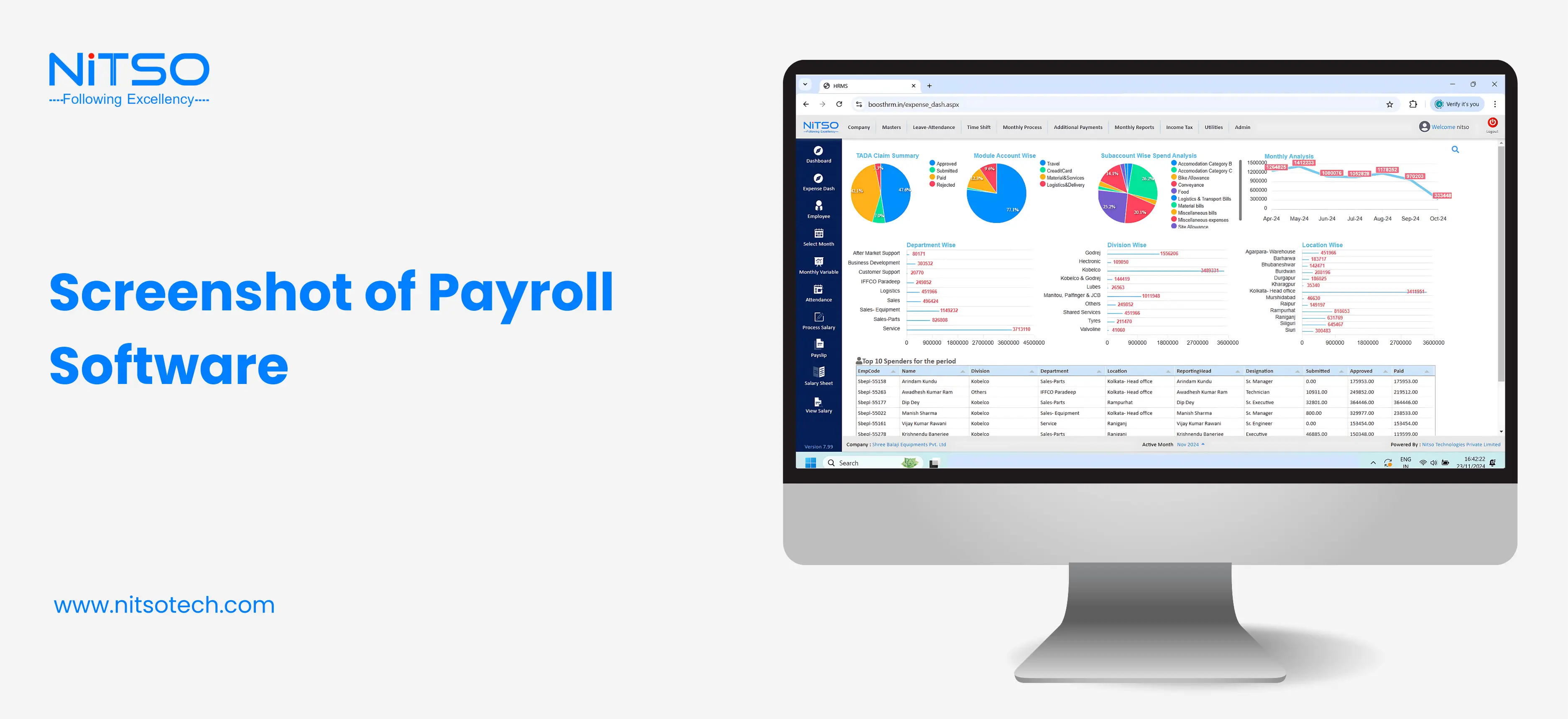
Screenshot of Payroll Management Software

Summary
Quick recap of the key points
To quickly pull everything together:
- Businesses usually start with manual/Excel payroll, sometimes outsource it to a CA, and eventually move to cloud-based software.
- Once headcount grows, manual payroll becomes slow, error-prone, and risky from a compliance angle.
- Payroll software saves time, reduces mistakes, strengthens compliance, and gives both management and employees better visibility.
- Choosing the right tool in India means checking compliance, flexibility, security, support, and real-world usability – not just a feature list.
When it’s the right time to switch to payroll software
A good rule of thumb: if your payroll needs more than a day of focused effort each month, or if one person’s absence can derail salaries, it’s time to switch.
It’s also time if:
- You’ve crossed 10–15 employees
- You operate in more than one state or city
- You’ve had compliance scares, penalties, or frequent payroll corrections
- Your HR team spends more time on salary sheets than on people
Shifting to software at the right time saves you from bigger issues later – especially when you’re growing fast.
Why Nitso can be a good fit for your business
If you’re an Indian business looking for a system that understands local rules, supports real-world salary structures, and comes with human support.
It combines:
- Indian payroll and compliance focus (PF, ESIC, TDS, PT, etc.)
- Cloud-based convenience and multi-location capability
- Scalable options as you grow
You can start small, get your basics right, and then expand into full HR and payroll automation as your needs become more complex.
External References
Official government links (PF, ESI, TDS, PT)
You can refer to these official portals for the latest rules and updates:
- Employees’ Provident Fund Organisation (EPFO) – https://www.epfindia.gov.in/
- Employees’ State Insurance Corporation (ESIC) – https://www.esic.gov.in/
- Income Tax Department of India – https://www.incometax.gov.in/
- Overview of state-wise Professional Tax rules – various state tax department sites and trusted payroll resources
Industry articles on payroll best practices
Some helpful reading on payroll management and best practices:
- Complete guides from Indian payroll providers on compliance and monthly processing
- Deep dives into statutory rules and practical payroll tips for SMEs
- Real-world case studies where companies moved from Excel to software and reduced errors
You can also explore Nitso’s own articles and glossaries for a wider HR perspective, such as:
Checklists to compare different payroll software
When shortlisting tools, use a simple internal checklist to compare features, pricing, and support. Along with payroll, most HR teams also need help with:
- Strategic planning, like human resource planning
- Hiring and post-hiring documentation, including
All of these pieces sit around payroll and HR, and using the right templates and tools keeps your documentation as organised as your payroll itself.
Frequently Asked Questions
What is payroll software?
Think of payroll software as your salary autopilot system.
Instead of sitting with calculators, Excel sheets, and random notes, payroll software keeps everything in one place – employee details, salary structure, taxes, deductions, and payslips.
At the end of the month, you don’t have to panic.
• How much each person should get paid
• What tax, PF, ESI, or other deductions apply
• Generating clean, professional payslips
In simple words: it makes sure your team gets paid correctly and on time, without you losing your mind over calculations.
How does payroll software work?
Here’s the simple version of how it works behind the scenes:
1. You set it up once – add employees, their CTC, salary breakups, leave policies, tax rules, etc.
2. Every month, it pulls data like attendance, leaves, overtime, bonuses, deductions, etc.
3. The software then calculates the final salary for each employee automatically.
4. You can download payslips, salary sheets, bank transfer files, and tax reports in a few clicks.
What are the key features of payroll software?
Monthly salary calculation (fixed + variable)
• Statutory deductions like PF, ESI, TDS, Professional Tax, etc.
• Payslip generation (PDF, email, or portal download)
• Full & final settlement when someone resigns
• Bonus, incentive, and reimbursement handling
• Reports for finance, audits, and management
• Sometimes an employee self-service portal so staff can download their own payslips, see tax details, etc.
You can think of it as a one-stop control panel for all salary-related work.
What are the benefits of using payroll software?
The benefits are very real, especially once your team starts growing:
• Saves a lot of time – no more manual salary sheets every month
• Reduces mistakes – wrong salary or tax errors can spoil trust and cause compliance issues
• Keeps you legally safe – helps you stay aligned with PF, ESI, TDS, and other rules
• Keeps employees happy – they get their salary on time with a clear breakup and slips
• Gives you clean records – if an auditor or investor asks for data, you’re not hunting through old folders
Basically, it turns payroll from a headache into a routine process.
Who should use payroll software?
If you’re paying people regularly, you’re ready for payroll software.
It doesn’t matter whether you have:
• 5 people in a small office
• 40 people in a growing startup
• 200+ employees across locations
Even with a small team, handling payroll manually every month gets boring, repetitive, and risky. One small mistake in Excel can mean underpaying or overpaying someone.
So whether you’re a freelancer with a small team, a startup founder, or an HR manager in a larger company, payroll software makes life easier.
What is the difference between payroll software and HR software/HRMS?
Good question, because people mix these up all the time.
Payroll software focuses mainly on
• Salary calculations
• Taxes and deductions
• Payslips and statutory reports
HR software / HRMS covers a bigger area like
• Recruitment
• Attendance and leave
• Performance reviews
• Training, onboarding, employee records, etc.
You can say:
HRMS looks at the whole employee journey.
Payroll software focuses on “how and what you pay them.”
Sometimes both come together in one system, and sometimes payroll is a separate module.

0 Comments